
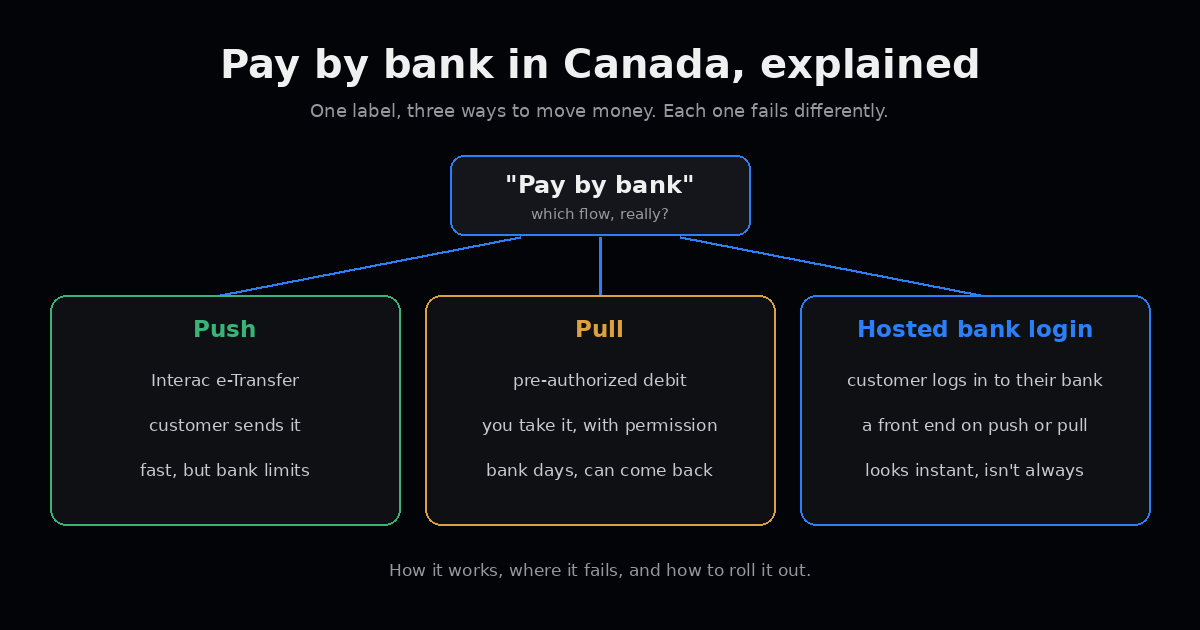
Someone on your team asks for “pay by bank.”
Product hears a button: the customer picks their bank, logs in, done. Finance hears cheaper than cards. Support hears fewer chargebacks. Engineering hears a new provider to integrate.
All four are partly right. The catch is that in Canada, “pay by bank” isn’t one thing. It’s a label stuck on top of several different ways to move money, and each one fails differently. If you pick a flow without knowing which one you picked, you find out in production.
This post is the plain version: how it works, where it breaks, and how to roll it out without surprising anyone.
Three flows under one label
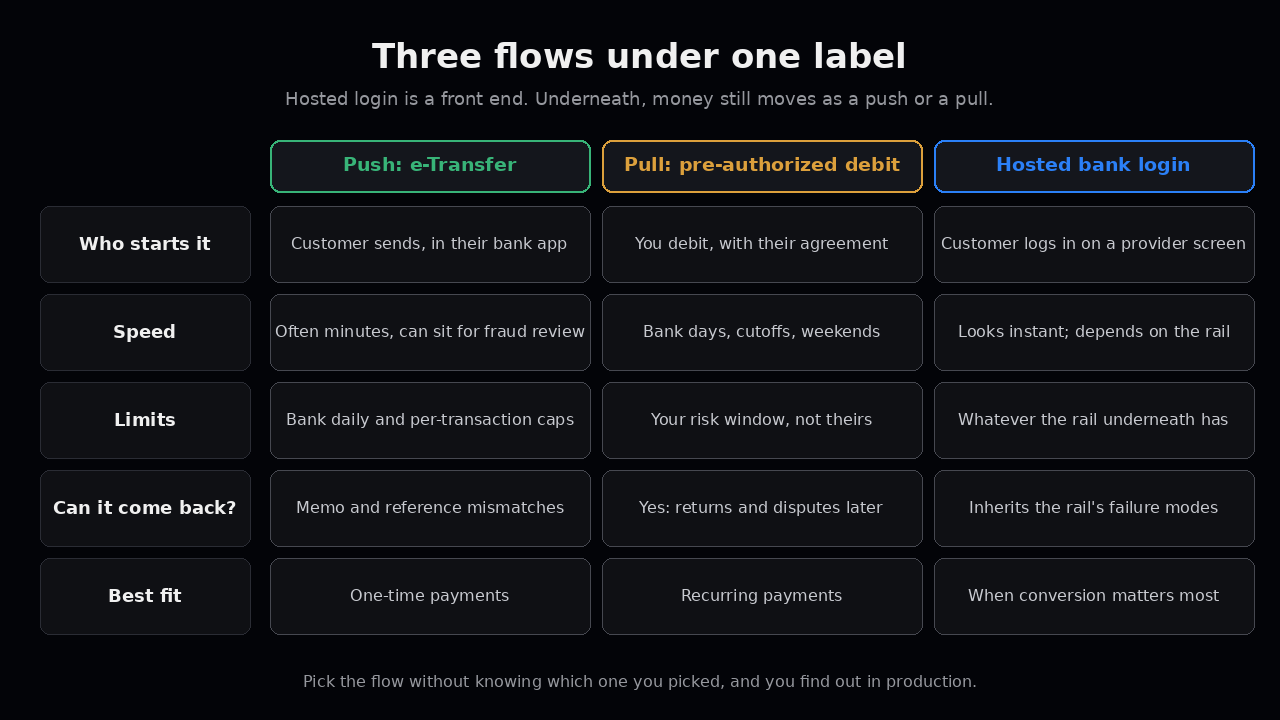
When a Canadian provider says “pay by bank,” it almost always means one of these.
1. Push: the customer sends you the money. This is usually Interac e-Transfer, either the customer sending to you or you sending a request money link. The customer approves it inside their own banking app. Money moves fast, often in minutes. You don’t pull anything.
2. Pull: you take the money with permission. The customer gives you their bank account and agrees to a pre-authorized debit (PAD). You, or your provider, send the debit through the EFT system. It’s cheap and it’s great for recurring payments. It’s also slow, and it can come back.
3. Hosted bank login. The customer picks their bank in a provider’s screen and logs in, or links the account. The provider checks the account and the balance, then moves the money using one of the two flows above behind the scenes. This is what most people picture when they say “pay by bank,” and it’s what an instant bank transfer product looks like from the outside.
Here’s the part that matters: flow 3 is a front end. Underneath, the money still moves as a push or a pull. So the failure modes of the rail underneath are still yours, even if the screen looks instant.
What the customer sees vs what the money does
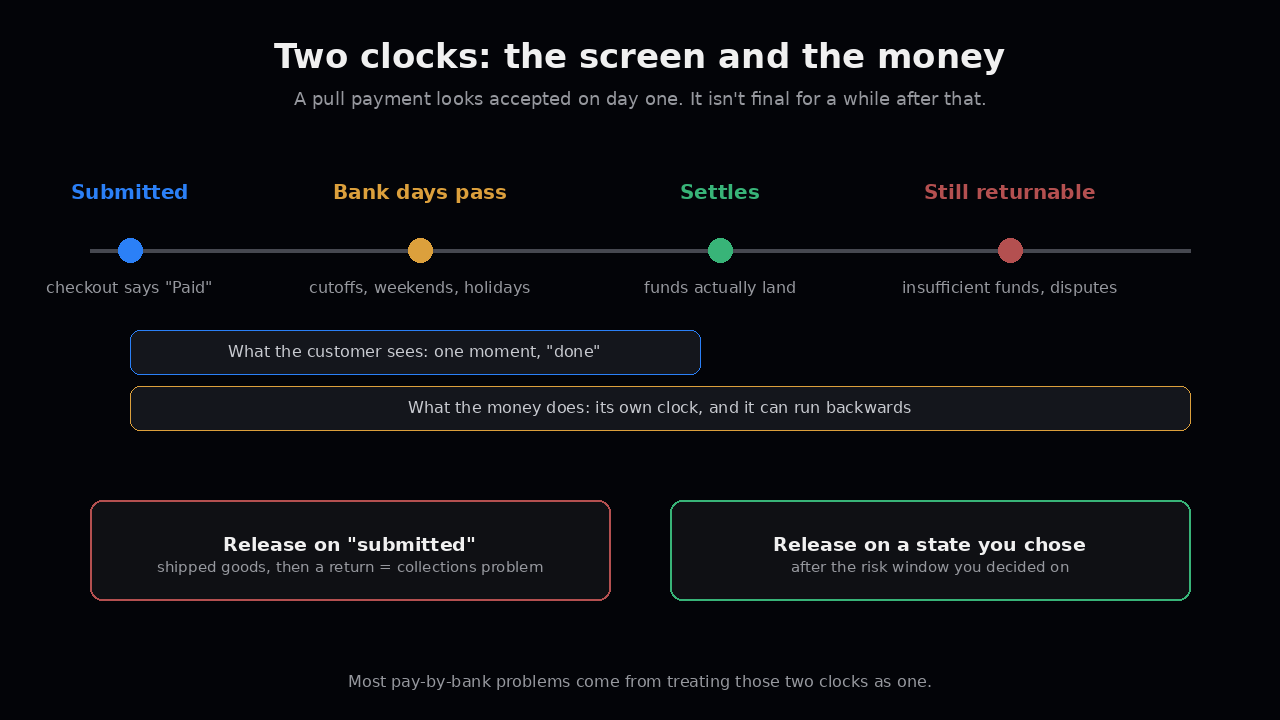
The checkout screen says “Paid.” That’s one clock.
The money has its own clock. A push transfer can land in minutes, but it can also sit for a fraud review at the sender’s bank. A PAD looks accepted the moment you submit it, but the funds don’t really settle until bank days pass, and the customer’s bank can still return it after that.
Most problems with pay by bank come from treating those two clocks as one. We wrote about the bank-day side of this in Tomorrow means next bank day and the returns side in Cleared isn’t final. Both apply here directly.
Where it fails
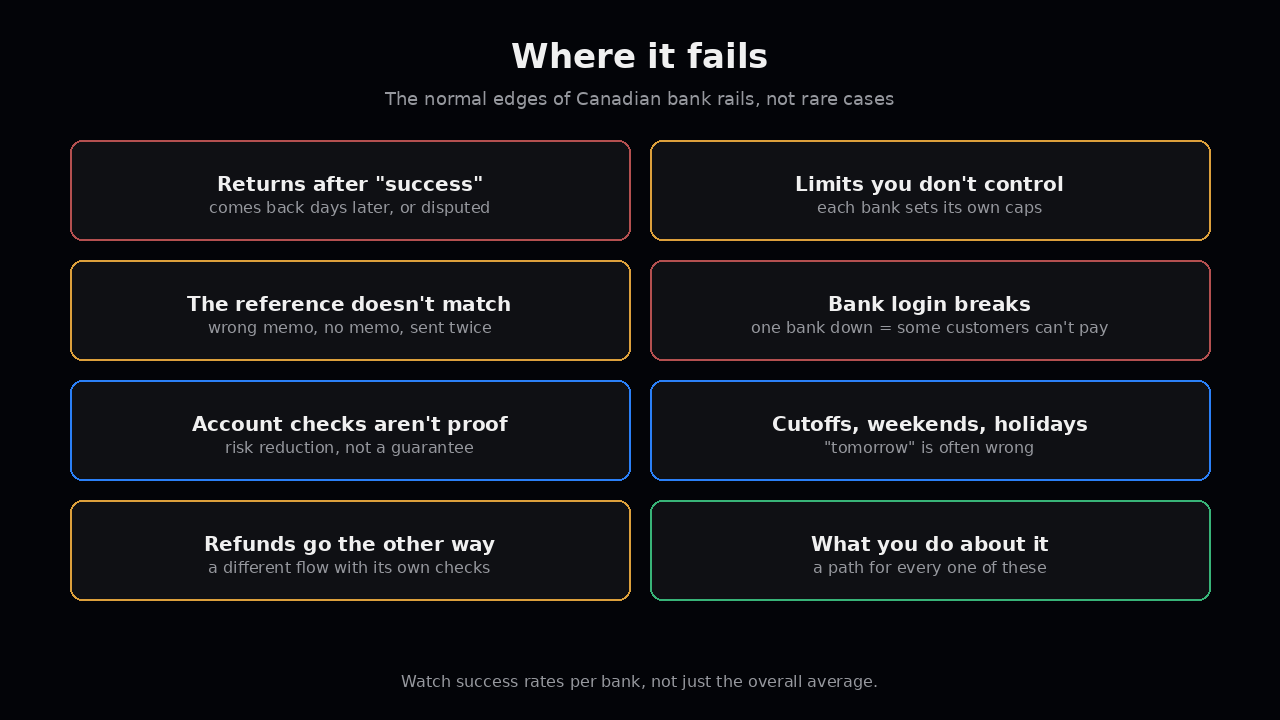
These are the ones we see again and again on Canadian bank payments.
- Returns after “success.” A PAD comes back for insufficient funds a few business days later. Or the customer disputes a debit that didn’t match their agreement, and personal PAD rules give them a long window to get that money back. If you already shipped the goods or released the balance, that’s now a collections problem.
- Limits you don’t control. Banks cap how much a customer can send by e-Transfer per day and per transaction, and every bank sets its own caps. A customer who’s happy to pay can still be unable to. Your product needs a clear “split this or use another method” path, not a generic error.
- The reference doesn’t match. With push payments, the customer controls the memo field. They type the wrong order number, or nothing, or send twice. Now someone in ops is matching deposits by hand. Push payments without a solid matching rule turn into a reconciliation queue fast.
- Bank login breaks. Hosted login flows depend on each bank’s login page and how the provider connects to it. Banks change their screens, add new security steps, or have outages. One bank breaking can mean a slice of your customers can’t pay that day. Watch success rates per bank, not just the overall average.
- Account checks that aren’t proof. Confirming an account exists isn’t the same as confirming the person paying owns it, or that the money will be there on debit day. Treat verification as risk reduction, not a guarantee.
- Cutoffs, weekends and holidays. EFT runs on bank days. A debit sent Friday evening before a long weekend moves days later than the calendar suggests. Customer-facing copy that says “tomorrow” will be wrong a lot.
- Refunds and payouts go the other way. Taking money by bank is half the job. Sending it back means a different flow, often a different provider setting, and its own checks. See Paying out is the scary direction before you promise “refunds to your bank account.”
None of these are rare. They’re the normal edges of how Canadian bank rails work.
What’s changing (and what isn’t)
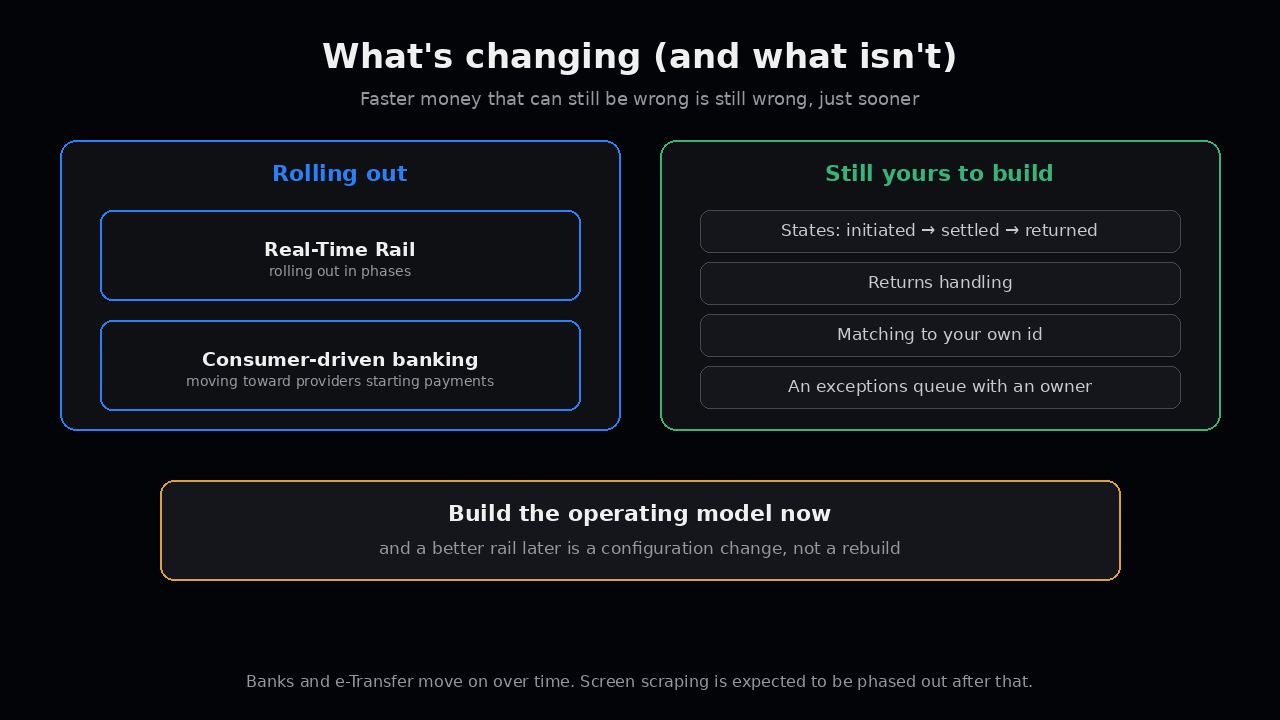
Two things are coming that will matter.
Payments Canada’s Real-Time Rail is rolling out in phases, with banks and e-Transfer moving onto it over time. And Canada’s consumer-driven banking framework (Canada’s version of open banking) is moving from sharing data toward letting approved providers start payments directly, with screen scraping expected to be phased out after that.
Both should make pay by bank faster and more standard. Neither removes the need for states, returns handling, matching and an exceptions queue. Faster money that can still be wrong is still wrong, just sooner. Build the operating model now, and swapping in a better rail later becomes a configuration change instead of a rebuild.
How to roll it out
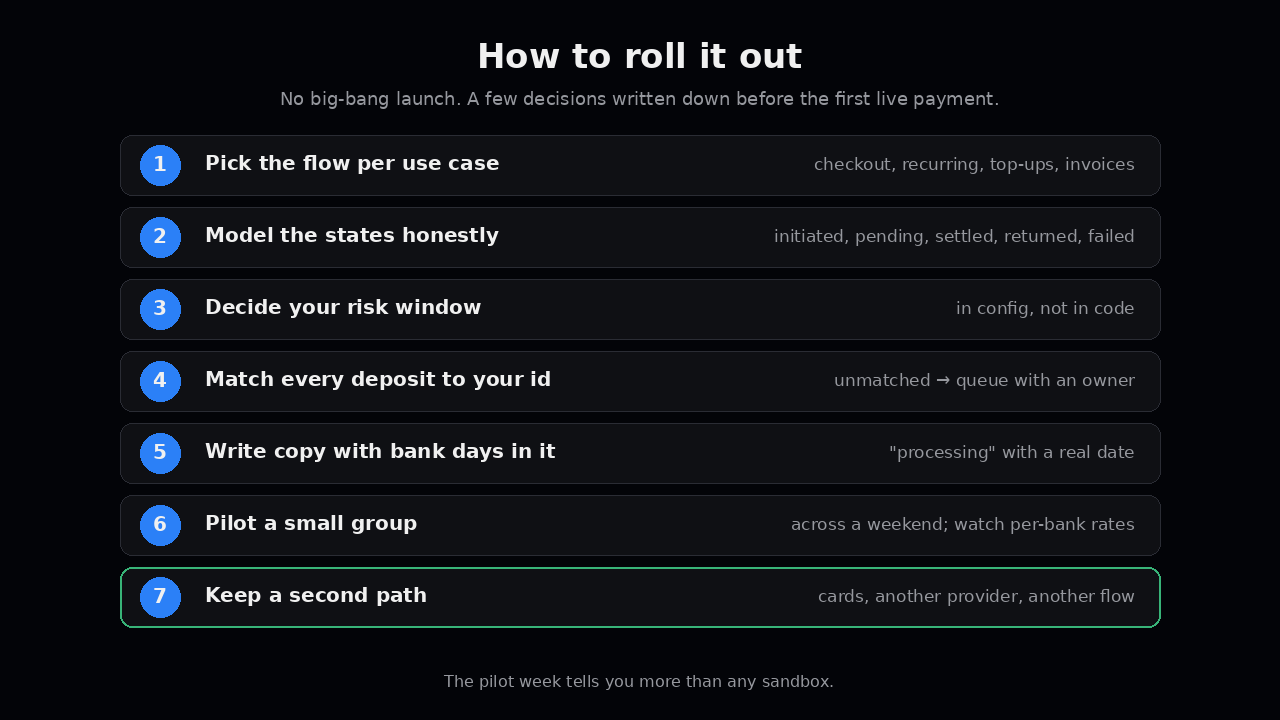
You don’t need a big-bang launch. You need a few decisions written down before the first live payment.
Pick the flow per use case. One-time checkout, recurring billing, wallet top-ups and B2B invoices want different flows. Push often fits one-time payments. PAD fits recurring ones. Hosted login fits when conversion matters most. Write down which flow handles which case, and why.
Model the states honestly. At a minimum: initiated, pending, settled, returned, failed. “Paid” in the UI should map to a state you chose on purpose. Decide which state releases goods, credits a balance, or lets a customer withdraw.
Decide your risk window. For pull payments, how long do you wait before you treat money as safe to give away? That’s a product and finance decision, not just an engineering one. Put it in config so you can tighten or loosen it without a deploy.
Match every deposit to your own id. Generate your payment id before you call anything, and carry it through. For push payments, use the structured reference fields your provider supports instead of trusting the free-text memo. Anything that doesn’t match goes into a queue with an owner. (More on the id in Your id comes first.)
Write the customer copy with bank days in it. “Your payment is processing and usually lands in 2–3 business days” beats “Paid!” followed by a support ticket. Tell people what happens if a debit comes back.
Pilot before you switch everyone over. Turn it on for a small group, across at least one weekend if you can. Watch when money actually lands, success rates per bank, return reasons, and what piles up in the exceptions queue. That week tells you more than any sandbox.
Keep a second path. Cards, a second bank provider, or another bank flow. When one bank’s login breaks or a customer hits their limit, they need somewhere to go that isn’t “contact support.”
What it looks like when it works
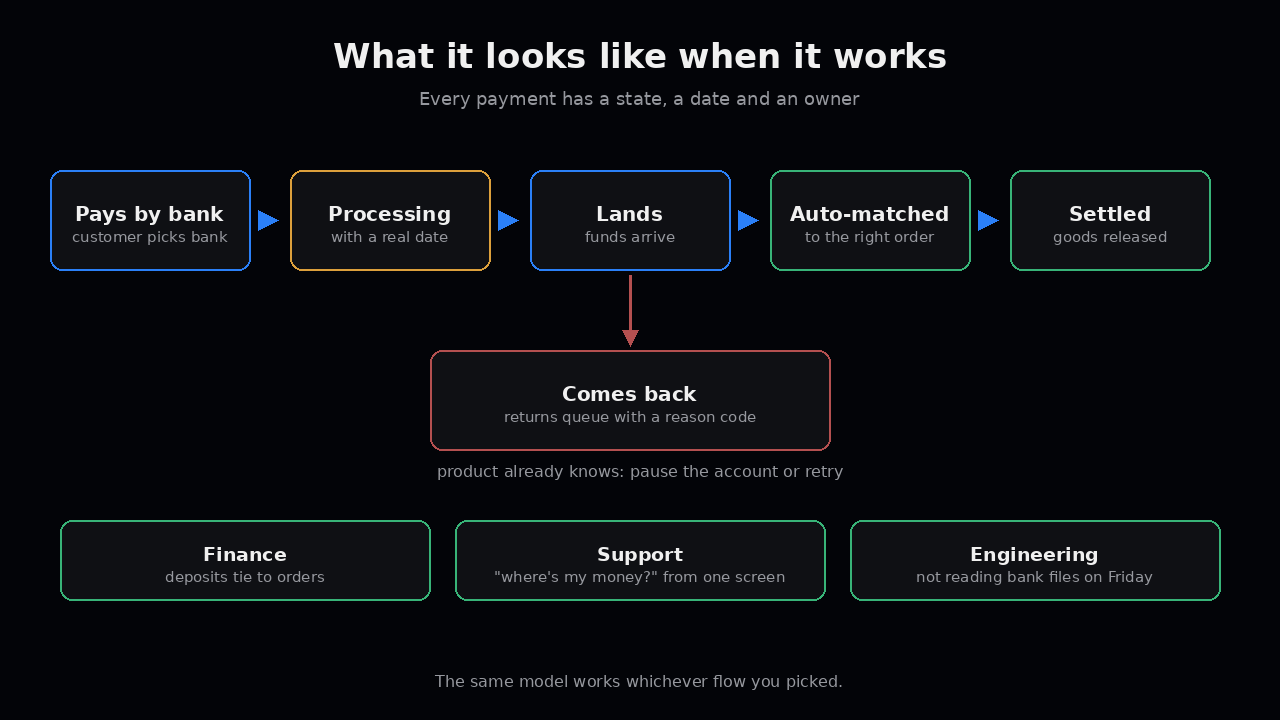
A customer picks their bank and pays. The product shows “processing” with a real date. The payment lands, matches automatically to the right order, and moves to settled. When one comes back, it lands in a returns queue with a reason code, and the product already knows whether to pause the account or retry.
Finance sees deposits that tie to orders. Support can answer “where’s my money?” from one screen. Engineering isn’t reading bank files on Friday afternoon.
We’ve done this work on real Canadian bank payment products, including rebuilding an instant bank transfer product used by large merchants. You can read that one in the Paramount Commerce case study.
How Bayefix handles this
Bayefix is the payment layer we build and run for platforms. Its bank checkout is built around the failure modes above, so here’s how it looks in practice.
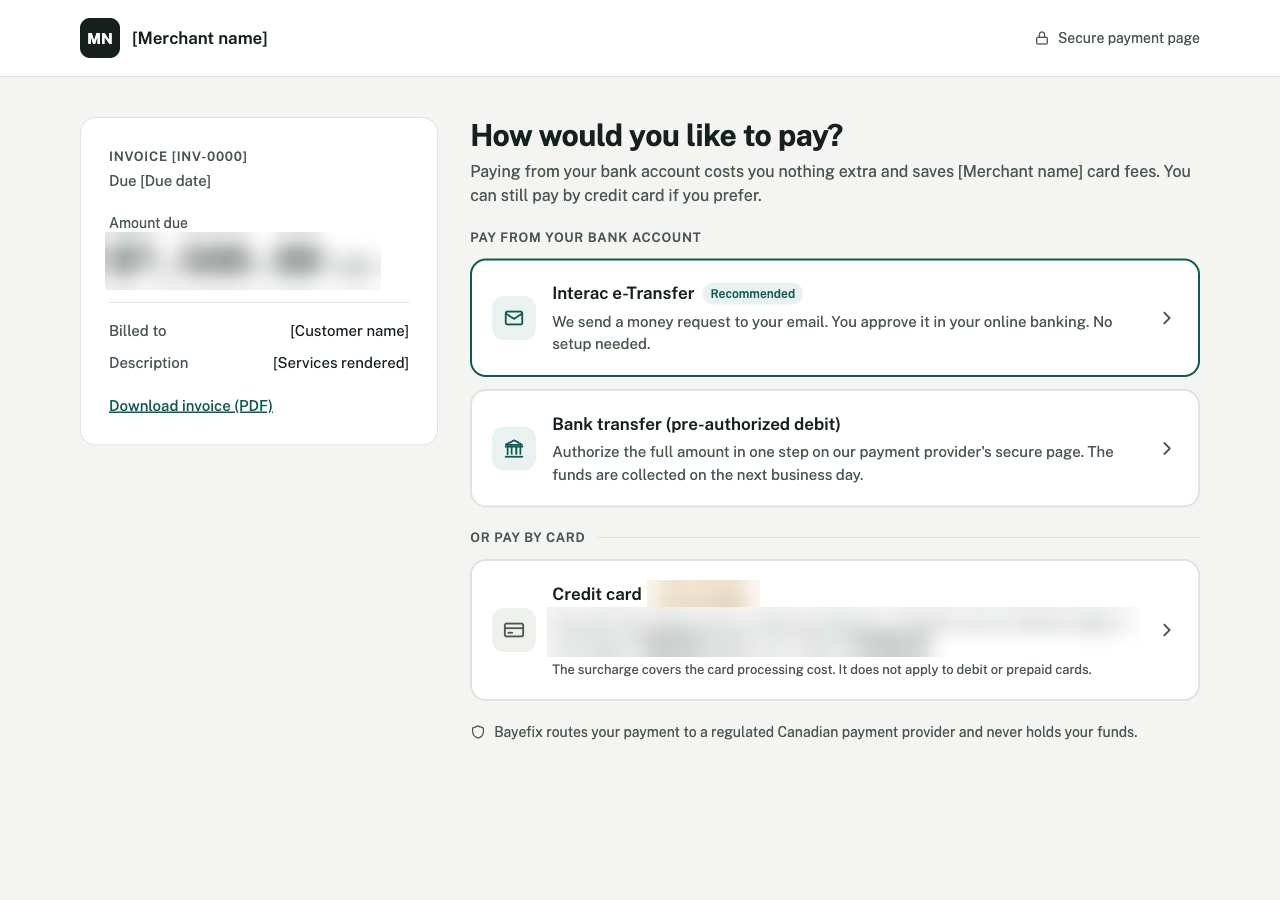
Bank first, and the choice is clear. The payer sees bank options first: Interac e-Transfer, or a bank transfer by pre-authorized debit that’s collected on the next business day. The page says it plainly: paying from your bank account costs you nothing extra.
Card fees shown before anyone clicks. If the payer still wants a card, the surcharge and the new total show on the option itself, along with which cards it doesn’t apply to. Nobody finds out at the last step.
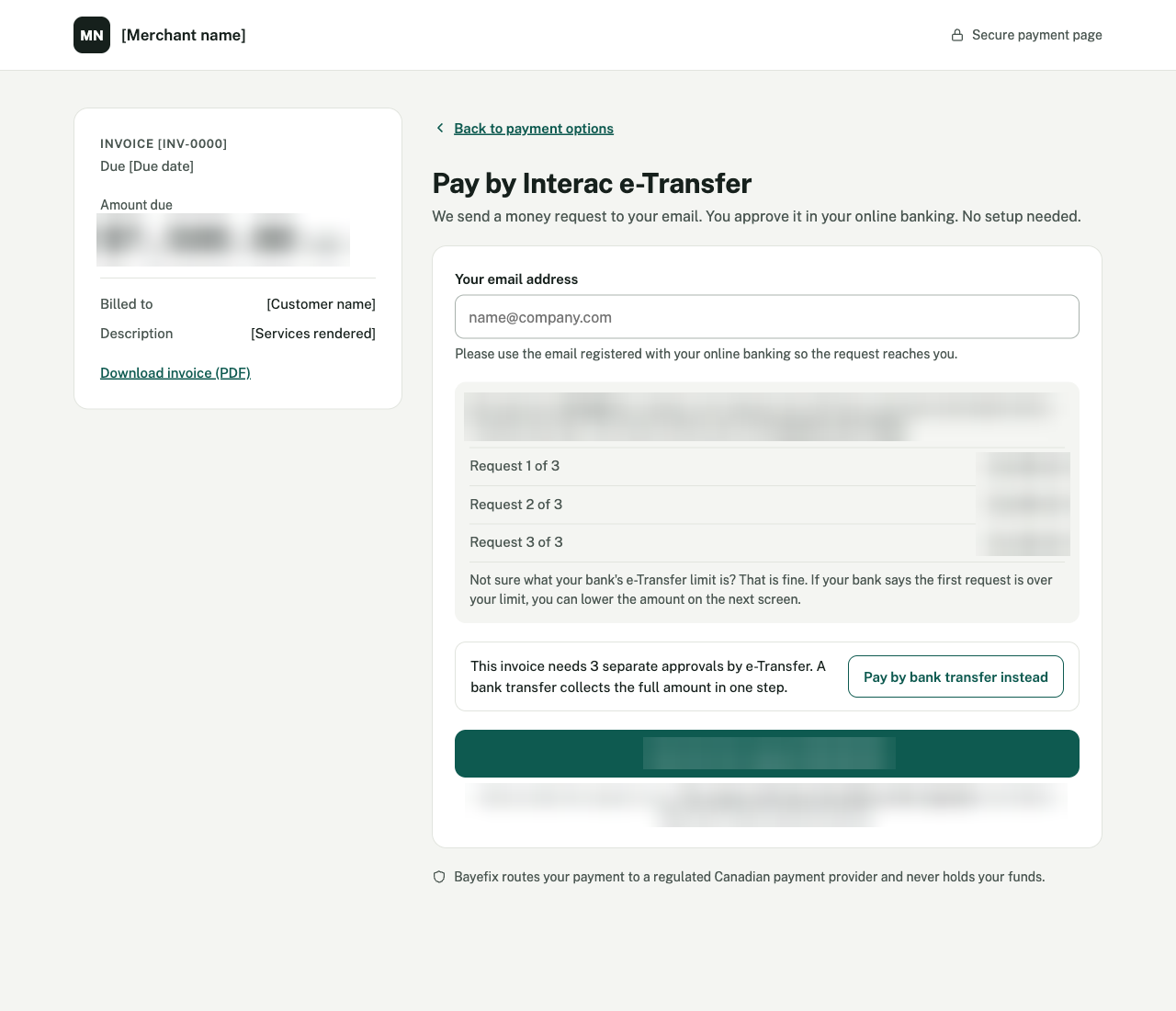
e-Transfer limits, handled up front. When an invoice is bigger than most banks let people send in a day, Bayefix splits it into separate requests, one every 24 hours, and shows the whole schedule before the first one goes out. If the payer’s bank says a request is over their limit, they can lower the amount and keep going instead of hitting a dead end.
Big invoices get steered to one step. The same screen says how many approvals the e-Transfer route will take, and offers “Pay by bank transfer instead” to collect the full amount at once by pre-authorized debit. That’s usually the better rail for a large invoice anyway.
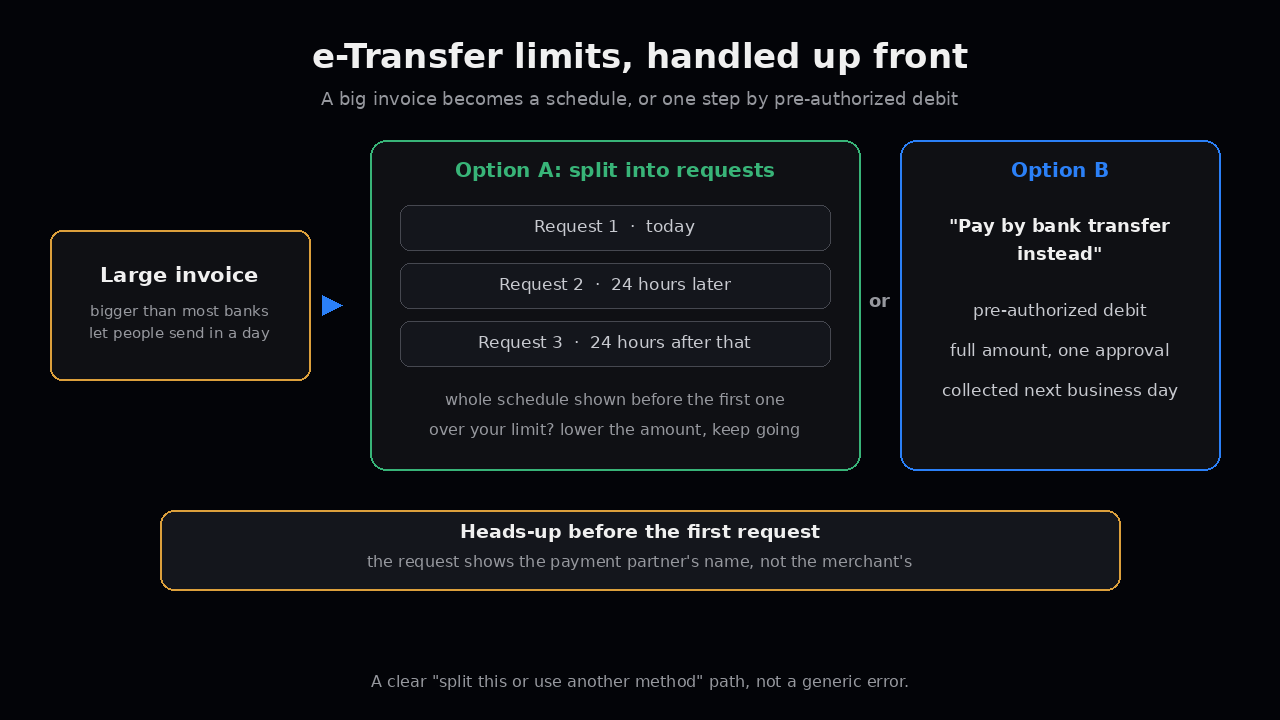
No surprise sender name. e-Transfer requests arrive under the payment provider’s name, not the merchant’s. People ignore requests from names they don’t recognize, so the page tells the payer ahead of time which name will appear and that it’s the merchant’s payment partner.
We never hold the money. Bayefix routes each payment to a regulated Canadian payment provider. Funds go from the payer to the merchant through that provider, never through us.
None of this removes returns, cutoffs or matching. It just stops the most common bank-payment confusion at the screen, before it turns into a support ticket. More on how it works on the Bayefix page.
What to check this week
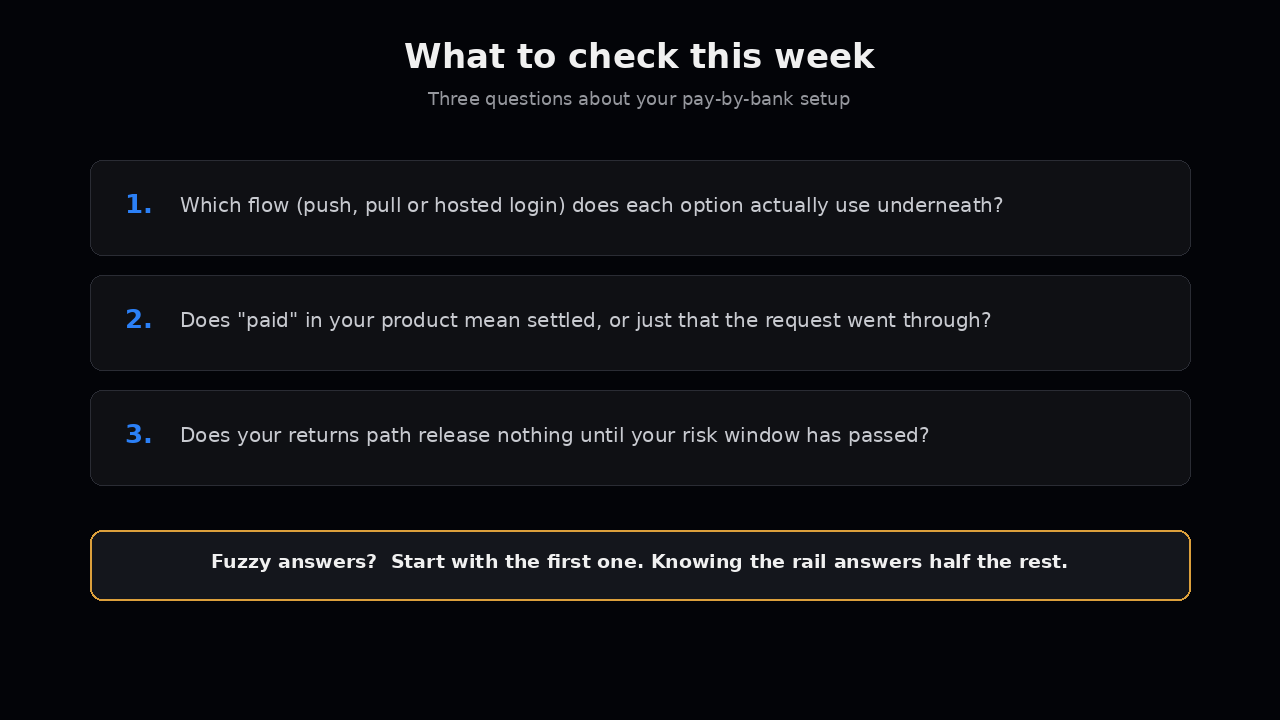
- Can you say which flow (push, pull or hosted login) each of your “pay by bank” options actually uses underneath?
- Does “paid” in your product mean settled, or does it just mean the request went through?
- Do you have a returns path that releases nothing until the risk window you chose has passed?
If any of those are fuzzy, start with the first one. Knowing which rail you’re really on answers half the other questions.
Futurify builds the software around your payments: the flows, the states, the matching and the queues for Canadian bank rails. We don’t hold funds. See Canadian bank rails for platforms, or email us at hello@futurify.io if you want to talk it through.